> ## Documentation Index
> Fetch the complete documentation index at: https://docs.unpage.ai/llms.txt
> Use this file to discover all available pages before exploring further.
# SolarWinds
Our SolarWinds integration allows [Agents](/concepts/agents) to search and analyze
log data from your SolarWinds Observability account.
* **search\_logs**: Search SolarWinds logs within a specified time range
## Prerequisites
[Log in to your SolarWnds account](https://swo.cloud.solarwinds.com/login), with Admin permsionns, and then go to ["Settings" > "Profile"](https://my.na-01.cloud.solarwinds.com/settings/profile).
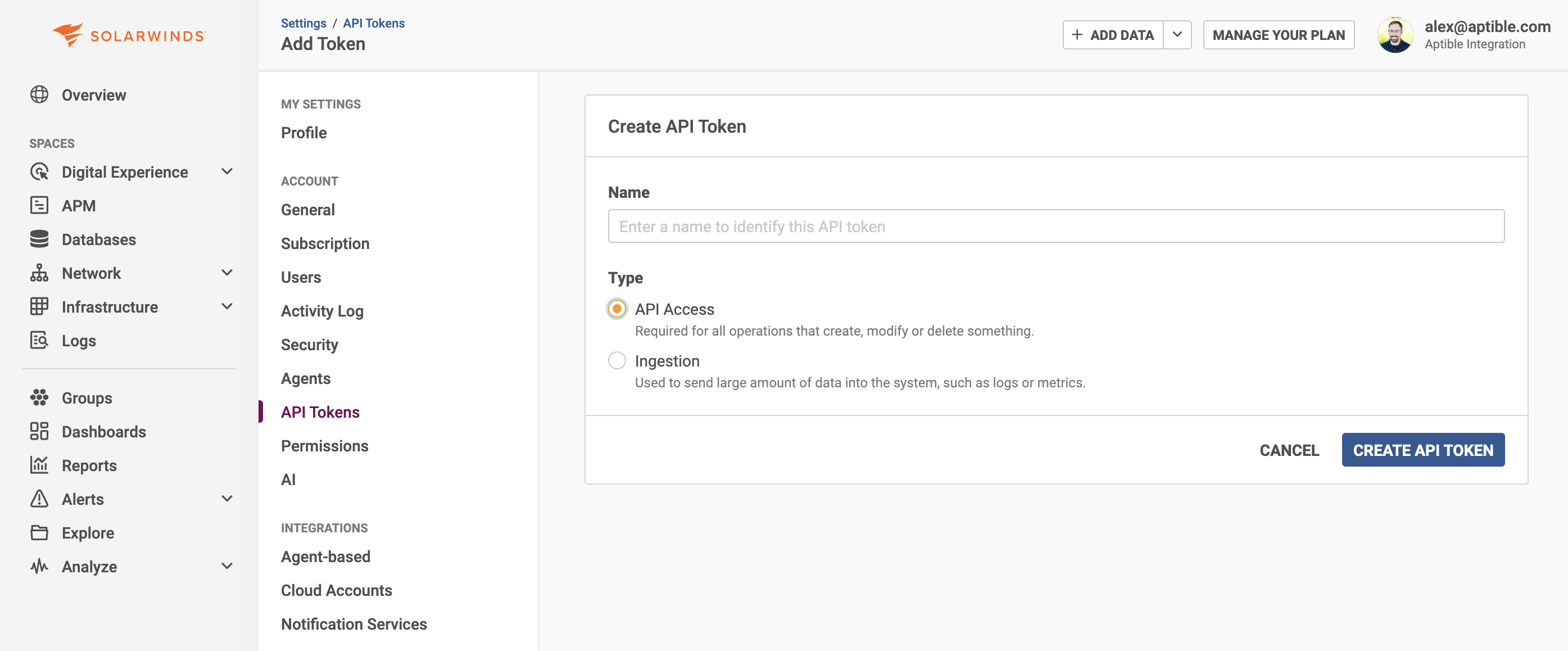 ## Configuration
Configure the SolarWinds plugin by running `uv run unpage configure` or by editing
the `~/.unpage/profiles//config.yaml` file:
```yaml theme={null}
plugins:
# ...
solarwinds:
enabled: true
settings:
token: # required
solarwinds_datacenter: # Default: 'na-01'
```
Alternatively, you can set these settings as environment variables:
```bash theme={null}
export SOLARWINDS_TOKEN="your-solarwinds-api-token"
export SOLARWINDS_DATACENTER="na-01"
```
## Tools
The SolarWinds plugin provides the following tools to Agents and MCP Clients:
Search SolarWinds for logs within a given time range.
**Arguments**
The search query. Use SolarWinds's search syntax to filter logs by hostname,
program, message content, or other criteria. For example: "error", "hostname:web01",
or "program:nginx AND status:500".
The starting time for the search range (ISO 8601 timestamp). Logs generated
at or after this time will be included in the results.
The ending time for the search range (ISO 8601 timestamp). Logs generated
at or before this time will be included in the results.
The maximum number of seconds to wait for the search to complete. Defaults to 10 seconds.
Increase this value for more comprehensive results in large log volumes, or decrease it
for faster response times.
**Returns** `SolarWindsSearchResult`: An object containing:
* `results`: Log events with details including timestamp and message.
* `truncated`: Boolean indicating if results were truncated due to response size limits.
* `timed_out`: Boolean indicating if the search timed out based on the specified timeout.
**Note**: Results are automatically truncated if they exceed response size limits to ensure optimal performance. Choose your search term and time narrowly, and iterate with additional searches if necessary, rather than trying to return the entire log context.
## Configuration
Configure the SolarWinds plugin by running `uv run unpage configure` or by editing
the `~/.unpage/profiles//config.yaml` file:
```yaml theme={null}
plugins:
# ...
solarwinds:
enabled: true
settings:
token: # required
solarwinds_datacenter: # Default: 'na-01'
```
Alternatively, you can set these settings as environment variables:
```bash theme={null}
export SOLARWINDS_TOKEN="your-solarwinds-api-token"
export SOLARWINDS_DATACENTER="na-01"
```
## Tools
The SolarWinds plugin provides the following tools to Agents and MCP Clients:
Search SolarWinds for logs within a given time range.
**Arguments**
The search query. Use SolarWinds's search syntax to filter logs by hostname,
program, message content, or other criteria. For example: "error", "hostname:web01",
or "program:nginx AND status:500".
The starting time for the search range (ISO 8601 timestamp). Logs generated
at or after this time will be included in the results.
The ending time for the search range (ISO 8601 timestamp). Logs generated
at or before this time will be included in the results.
The maximum number of seconds to wait for the search to complete. Defaults to 10 seconds.
Increase this value for more comprehensive results in large log volumes, or decrease it
for faster response times.
**Returns** `SolarWindsSearchResult`: An object containing:
* `results`: Log events with details including timestamp and message.
* `truncated`: Boolean indicating if results were truncated due to response size limits.
* `timed_out`: Boolean indicating if the search timed out based on the specified timeout.
**Note**: Results are automatically truncated if they exceed response size limits to ensure optimal performance. Choose your search term and time narrowly, and iterate with additional searches if necessary, rather than trying to return the entire log context.